Extension for Chrome, Edge, Brave, Opera and more
Save video from any site in one click
Hover over the player and press Download. Vidsavo stitches the stream from hundreds of segments and saves one MP4 with sound. Live streams too.
Mac and Windows. Every Pro feature free for the first 7 days.
Three steps from player to file
- 1
Hover over the video
A red Download button appears in the corner of the player. No need to open the extension.
- 2
Click and pick a quality
One click saves in your default quality. The arrow next to it lists every option, from 360p to 4K.
- 3
Open the finished MP4
The file with picture and sound lands in Downloads. The icon shows progress and a notification tells you when it is ready.
Everything it takes to keep the video
A button right on the player
Shows up when you hover over any video on the page, even when the player is covered by its own controls.
Record live streams
Records the broadcast until you press Stop and save. It stops instantly and keeps everything recorded.
Several downloads at once
Each one shows a live preview, speed and time left. The rest wait in a queue and start on their own.
Sound and picture in one file
Many sites send audio as a separate track. Vidsavo joins them without re-encoding or quality loss.
Resumes when a link expires
Sites hand out temporary access to video. When it runs out mid-download, Vidsavo fetches a fresh link and carries on.
HLS and DASH streams
Stitches video from hundreds of segments, decrypts AES-128 protected streams and picks the quality — just like the site's own player.
Settings your way
Folder and file name, default quality, live auto-stop, button position on the player, language. Saved instantly, with a backup file.
Keyboard shortcut
Saves the video on the open page without a single window. A check mark flashes on the icon and the rest happens by itself.
What it looks like
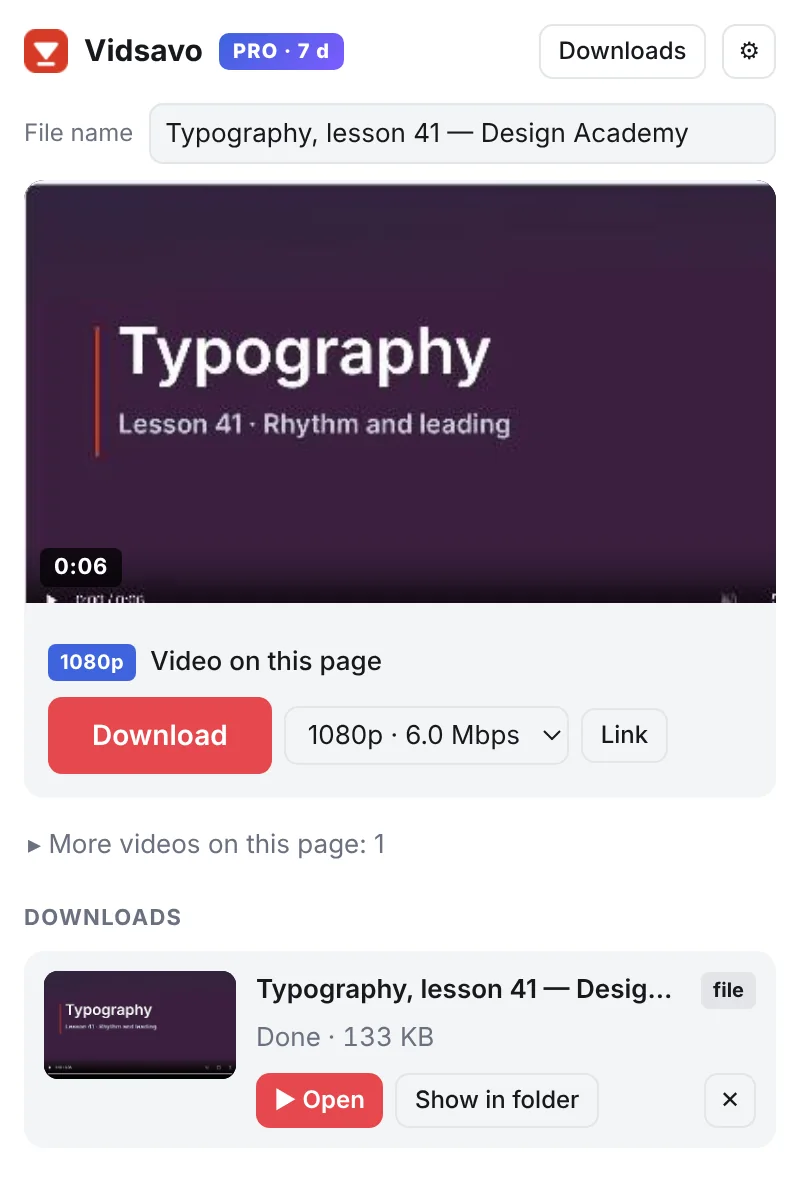
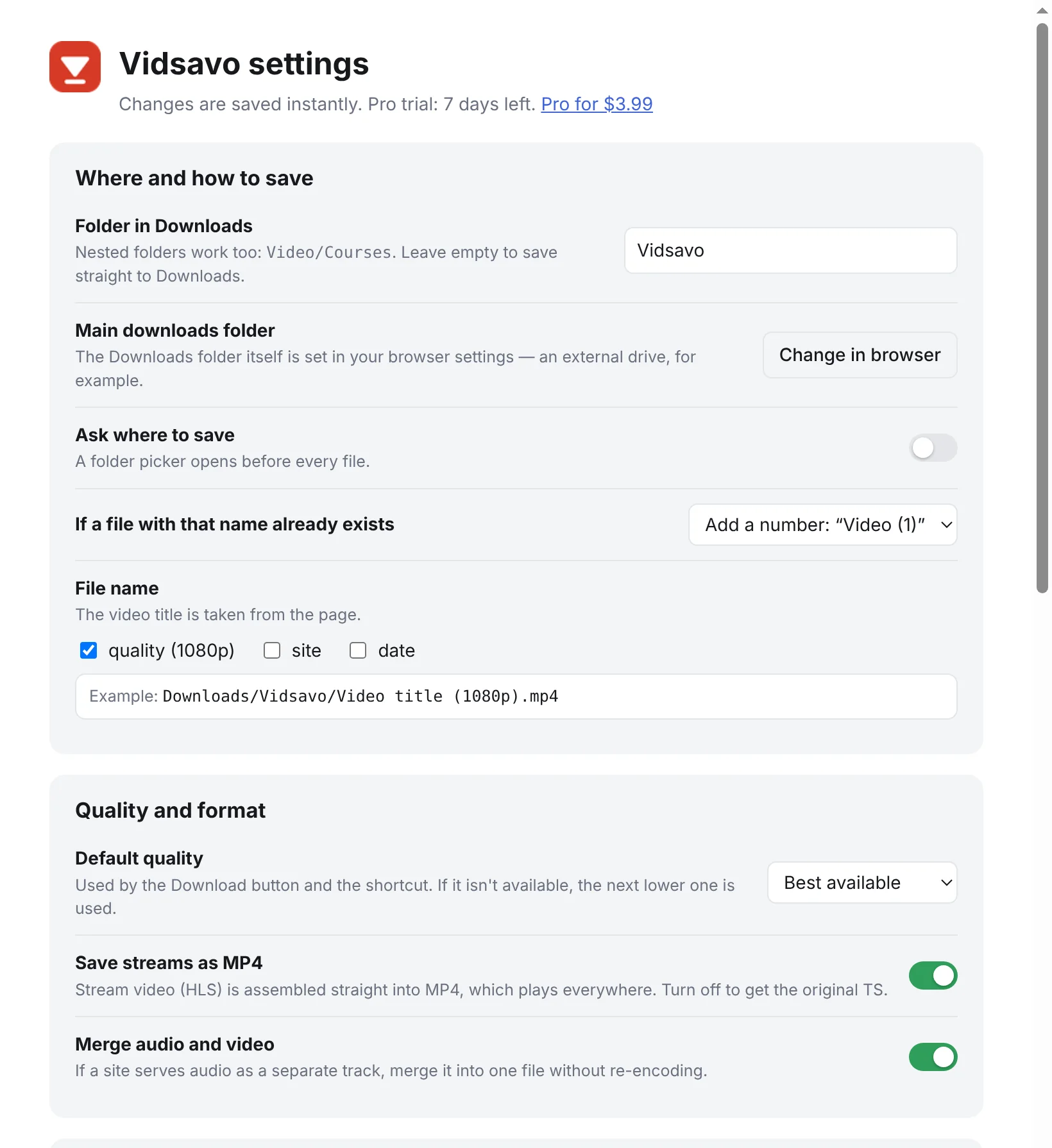
A week of Pro on us. Then free, or Pro forever
You get every Pro feature for the first 7 days after install. After that the free plan stays, and Pro is a one-time purchase that works forever. It switches on by itself right after payment.
Free
$0
- All of Pro for the first 7 days
- Then 2 downloads at a time
- Up to 1080p
- Live recording up to 15 minutes
- Player button, shortcut, MP4
Pro lifetime
$3.99one time
- Up to 6 downloads at a time with twice the connections
- Any quality, including 4K
- Unlimited live recording
- Sound and picture in one file
- Pause and resume downloads
- One key for up to 3 computers
You buy Pro right inside the extension — any time, including during the free week.
Free and Pro
| Free | Pro | |
|---|---|---|
| Downloads at a time | 2 | 6 |
| Connections | 8 | 16 |
| Quality | up to 1080p | any, including 4K |
| Live recording | up to 15 minutes | unlimited |
| Sound and picture in one file | — | ✓ |
| Pause and resume | — | ✓ |
| HLS, DASH, MP4, player button, settings | ✓ | ✓ |
Set up in a minute
- Unzip the archive. On Windows, double-click
Install-Windows.bat. On Mac, open Terminal and runbash ~/Downloads/Vidsavo/Install-Mac.command. - The installer finds your browser and opens the extensions page. Turn on Developer mode there.
- Drag the
extensionfolder from the window that opened onto the extensions page. Done — updates arrive on their own after that.
Questions
Which sites does it work on?
Most sites that play video in an embedded player: course platforms, news, live broadcasts, sites with direct MP4 links and HLS or DASH streams. It does not download DRM-protected video (streaming services) or YouTube.
Can I choose the folder and file name?
Yes. Settings let you pick a folder inside Downloads (nested ones too, like Video/Courses) and add quality, site and date to the file name. Turn on Ask where to save to choose any folder each time — even on an external drive.
What languages is it in?
English and Russian. It follows your browser language, and you can switch it in settings.
What if I close the tab or my connection is slow?
The download keeps going. Close the tab with the video and the download continues. Close the Downloads tab and it reopens and resumes where it left off, keeping what was already saved. On a slow connection, live streams are fetched in several parts at once; if the speed is still not enough, the file stays complete and Vidsavo tells you how many seconds of the stream were skipped.
Is this allowed?
Save video you have the rights to: your own recordings, course material you bought for personal viewing, openly licensed video. The owner and the site set the rules for each video.
What happens after 7 days?
The extension switches to the free plan on its own: 2 downloads at a time, up to 1080p, live recording up to 15 minutes. Everything you saved stays yours. You can buy Pro any time.
Is it safe to install?
The extension runs in your browser and never sends your videos or browsing history anywhere. Updates are signed, so it will not install a tampered version.
Why is Developer mode needed?
Until Vidsavo is published in the Chrome Web Store, browsers only allow installing extensions from a file this way. It is a standard feature of Chrome and other browsers.
How do I move Pro to another computer?
A key works on three computers. It arrives by email after purchase — enter it on the Pro page. To free a slot, choose Unlink from this browser on the old computer.